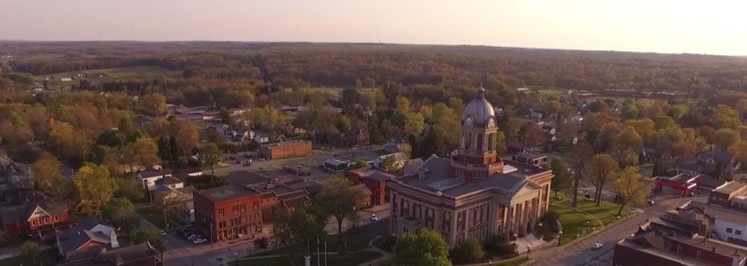
Mercer County, Pennsylvania


Work Location Start Date

Mercer County Reassessment
The Mercer County countywide reassessment is now complete. If you have any questions or concerns, please contact:
Mercer County Assessment Office
Mercer County Court House
125 S. Diamond Street, Suite 4
Mercer, PA 16137
There is a link at the top of this page that will take you directly to the County’s website, which will provide other contact information.
Watch a Full Recorded Demo
Cards Module
Click to Edit
Use the Variables Section on right to change the image. Look for Cards Top Left Image, then add the URL for your image into the box provided. You can use any image from any source: TylerTech.com, Marketo Design Studio, etc.
Click to Edit
Use the Variables Section on right to change the image. Look for Cards Top Right Image, then add the URL for your image into the box provided. You can use any image from any source: TylerTech.com, Marketo Design Studio, etc.
Click to Edit
Use the Variables Section on right to change the image. Look for Cards Bottom Left Image, then add the URL for your image into the box provided. You can use any image from any source: TylerTech.com, Marketo Design Studio, etc.
Click to Edit
Use the Variables Section on right to change the image. Look for Cards Bottom Right Image, then add the URL for your image into the box provided. You can use any image from any source: TylerTech.com, Marketo Design Studio, etc.
Quote Module: PSAP consolidation has demonstrated cost savings amount political entities via shared equipment, personnel, and phisical facilities.
Donald Harpster
IT Coordinator, Stark County Sheriff's Office, Ohio
- Jul. 18, 2025 – Data collection begins in Coolspring Township, Jackson Center Borough, Jackson Township, and Mercer Borough
- Jul. 9, 2025 – Data collection begins in Fairview Township, Fredonia Borough, Lake Township, Stoneboro Borough, and Findley Township
- Jun. 6, 2025 – Data collection begins in Jefferson Township and Delaware Township
- May 23, 2025 – Data collection begins in Lackawannock Township and East Lackawannock Township
- Apr. 14, 2025 – Data collection begins in Liberty Township, Springfield Township, and Wilmington Township
- Feb. 24, 2025 – Residential data collection begins in French Creek Township, New Lebanon Borough, Mill Creek Township, Sandy Lake Township, Worth Township, Wolf Creek Township, and Pine Township
- Jan. 31, 2025 – Commercial data collection begins in Grove City
- Jan. 24, 2025 – Residential data collection begins in Grove City Borough
- Jan. 8, 2025 – Residential data collection begins in Sharpsville Borough
- Nov. 15, 2024 – Residential data collection begins in Deer Creek Township, Perry Township, and New Vernon Township
- Nov. 1, 2024 – Residential data collection begins in Otter Creek Township, Salem Township, Sandy Creek Township, and Sheakleyville Borough
- Oct. 23, 2024 – Residential data collection begins in Sugar Grove Township
- Oct. 7, 2024 – Commercial data collection begins in Sugar Grove, Greenville, and Hempfield Township
- Oct. 1, 2024 – Residential data collection begins in Greenville Borough and Hempfield Township
- Sept. 26, 2024 – Residential data collection begins in West Salem Township and Greene Township
- Sept. 26, 2024 – Commercial data collection begins in Jamestown Borough, West Salem Township, and Greene Township
- Aug. 22, 2024 – Residential data collection begins in Jamestown Borough
- Aug. 19, 2024 – Commercial data collection begins in Pymatuning Township, South Pymatuning Township, and Clark Township
- July 15, 2024 – Residential data collection begins in Clark Borough
- July 15, 2024 – Residential data collection begins in South Pymatuning Township
- July 15, 2024 – Residential and Commercial data collection begins in Pymatuning Township
- Feb. 26, 2024 – Residential and Commercial data collection begins in the City of Sharon
- Jan. 3, 2024 – Residential data collection begins in the City of Hermitage
- Dec. 7, 2023 – Commercial data collection begins in City of Hermitage (formerly Wheatland Borough)
- Nov. 27, 2023 – Residential data collection begins in City of Farrell
- Nov. 20, 2023 – Commercial data collection begins in Shenango Township
- Nov. 15, 2023 – Residential data collection begins in City of Hermitage (formerly Wheatland Borough)
- Oct. 12, 2023 – Residential data collection begins in Shenango Township
- Oct. 5, 2023 – Commercial data collection begins in West Middlesex Borough and Township
- Sept. 27, 2023 – Commercial data collection begins in Coolspring Township
- Sept. 25, 2023 – Residential data collection begins in West Middlesex
- Aug. 31, 2023 – Commercial data collection begins in Mercer Borough
Mercer County Reassessment
Making use of the latest mass appraisal technology & proprietary software applications, Tyler Technologies has been contracted to employ uniform standards of mass appraisal practices by collecting exterior property characteristics and use this information along with legacy records, location and recent sales data, to support fair and equitable valuation of real property for Mercer County.
Happening Now
Final value notices will be mailed out by Mercer County after July 1, 2026. Property owners will have the opportunity to file a formal appeal with the Mercer County Board of Assessment Appeals after receiving this final value notice at no charge to the property owner.
Mercer County is committed to establishing the fair-market value of all properties based on the most accurate information available. We encourage you to participate in this process and look forward to assisting you through this informal review process.
For more information, please download our frequently asked questions (FAQ) document and check back here for updates as the project progresses.
Contact Information
Mercer County Contact Information
Cathy S. Herriott, Chief Assessor
125 S. Diamond Street, #4
Mercer, PA 16137
E-mail: [email protected]
Phone Number: 724.662.3800 ext. 2505
Office Hours: 8:30 AM - 4:30PM | Mon-Fri
Tyler Contact Information
125 S. Diamond Street, #504
Mercer, PA 16137
E-mail: [email protected]
Phone Number: 724.662.7549
Key Project Dates:
- Tentative Start Date: August 1, 2023
- Proposed Completion Date: November 25, 2026 (for tax year 2027)
Public Meetings:
- Mon., Mar. 4, 2024, 6 p.m., at Sharon Senior High School, 1129 E. State Street, Sharon, PA
- Mon., Jan. 29, 2024, 11 a.m., at Shenango Valley Senior Community Center, 220 N. Buhl Farm Dr., Hermitage, PA
- Wed., Oct. 18, 2023, 2 p.m., at Pine Township Social Hall, 1252 South Center Street, Grove City, PA
- Tues., Oct. 10, 2023, 2 p.m., at Sharon City Building, 155 W. Conley Blvd, Sharon, PA
- Wed., Oct. 4, 2023, 6 p.m., at Greenville High School, 9 Donation Road, Greenville, PA
- Thurs., Sept. 28, 2023, 6:30 p.m., at the Penn State Extension Office, 463 North Perry Highway, Mercer, PA
- Mon., Sept. 18, 2023, 6 p.m., at the Lakeview High School, 2482 Mercer Street, Stoneboro, PA
- Tues., Sept. 12, 2023, 6 p.m., at the Hermitage VFW, 5550 E. State Street, Hermitage, PA
Materials:
Proposed Milestone Dates:
- Public Information Program: July 2023 – November 2026
- Data Collection: August 2023 – May 2026
- Data Mailers: March 2024 – June 2026
- Valuation Analysis: July 2025 – March 2026
- Tentative Value Notices: March 2026 – April 2026
- Informal Review Meetings: March 2026 – June 2026
- Certified Final Value Change Notices: June 2026 – July 2026
- Formal Appeals: August 2026 – October 2026
- Project Finalization: October 2026 – November 2026
Thank you for reaching out. Check your email for details.
Want more information?
Change the backgound image with "Block Left Background Image" and change the color with "Block Left Color"
Download NowHave questions?
Change the backgound image with "Block Right Background Image" and change the color with "Block Right Color"
Ask a QuestionChecker Board Module: First Row
Edit the text in this module just like a Word Doc: Use italic, bold, embed images, videos, links, add or remove the button. There are 4 rows total, two are hidden by default. PLEASE NOTE: To turn on the hidden rows, use the toggles Board Third Row Section & Board Fourth Row Section Add a link to the image using the variable Board First Row Link.
View Project
Have additional questions?
We compiled a list of frequently asked questions to help you better understand how a reassessment works and how it affects you. Click the link below to review the questions and responses.
View FAQChecker Board Module: Third Row
Edit the text in this module just like a Word Doc: Use italic, bold, embed images, videos, links, add or remove the button. There are 4 rows total, two are hidden by default. PLEASE NOTE: To turn on the hidden rows, use the toggles Board Third Row Section & Board Fourth Row Section Add a link to the image using the variable Board Third Row Link.
View ProjectChecker Board Module: Fourth Row
Edit the text in this module just like a Word Doc: Use italic, bold, embed images, videos, links, add or remove the button. There are 4 rows total, two are hidden by default. PLEASE NOTE: To turn on the hidden rows, use the toggles Board Third Row Section & Board Fourth Row Section Add a link to the image using the variable Board Fourth Row Link.
View Project
Checker Board Module: First Row
Edit the text in this module just like a Word Doc: Use italic, bold, embed images, videos, links, add or remove the button. There are 4 rows total, two are hidden by default. PLEASE NOTE: To turn on the hidden rows, use the toggles Board Third Row Section & Board Fourth Row Section Add a link to the image using the variable Board First Row Link.
View Project
Checker Board Module: Second Row
Edit the text in this module just like a Word Doc: Use italic, bold, embed images, videos, links, add or remove the button. There are 4 rows total, two are hidden by default. PLEASE NOTE: To turn on the hidden rows, use the toggles Board Third Row Section & Board Fourth Row Section Add a link to the image using the variable Board Second Row Link.
View Project
Checker Board Module: First Row
Edit the text in this module just like a Word Doc: Use italic, bold, embed images, videos, links, add or remove the button. There are 4 rows total, two are hidden by default. PLEASE NOTE: To turn on the hidden rows, use the toggles Board Third Row Section & Board Fourth Row Section Add a link to the image using the variable Board First Row Link.
View Project
Checker Board Module: Second Row
Edit the text in this module just like a Word Doc: Use italic, bold, embed images, videos, links, add or remove the button. There are 4 rows total, two are hidden by default. PLEASE NOTE: To turn on the hidden rows, use the toggles Board Third Row Section & Board Fourth Row Section Add a link to the image using the variable Board Second Row Link.
View Project
Checker Board Module: First Row
Edit the text in this module just like a Word Doc: Use italic, bold, embed images, videos, links, add or remove the button. There are 4 rows total, two are hidden by default. PLEASE NOTE: To turn on the hidden rows, use the toggles Board Third Row Section & Board Fourth Row Section Add a link to the image using the variable Board First Row Link.
View Project
Checker Board Module: Second Row
Edit the text in this module just like a Word Doc: Use italic, bold, embed images, videos, links, add or remove the button. There are 4 rows total, two are hidden by default. PLEASE NOTE: To turn on the hidden rows, use the toggles Board Third Row Section & Board Fourth Row Section Add a link to the image using the variable Board Second Row Link.
View Project
Checker Board Module: First Row
Edit the text in this module just like a Word Doc: Use italic, bold, embed images, videos, links, add or remove the button. There are 4 rows total, two are hidden by default. PLEASE NOTE: To turn on the hidden rows, use the toggles Board Third Row Section & Board Fourth Row Section Add a link to the image using the variable Board First Row Link.
View Project
Checker Board Module: Second Row
Edit the text in this module just like a Word Doc: Use italic, bold, embed images, videos, links, add or remove the button. There are 4 rows total, two are hidden by default. PLEASE NOTE: To turn on the hidden rows, use the toggles Board Third Row Section & Board Fourth Row Section Add a link to the image using the variable Board Second Row Link.
View ProjectFooter Hero Module
Use the variable Footer Hero Image URL on the right to add your Image URL for the backgroud. Then, edit your text to match. You can change the alignment, color, style, remove the button, etc.